Karting video analysis means reviewing onboard footage alongside lap and speed data so you can see where time is gained or lost. Video alone shows what you did, but not how fast you were doing it, so the most useful approach pairs footage with GPS speed and compares one corner at a time.
Most karters film sessions and rarely watch them again. This post covers how to film so laps are comparable, what to look for, and how to connect what you see to the setup you ran.
What can onboard video tell you?
Onboard video shows your lines, braking and steering inputs, how traffic affected a lap, and how the kart behaves on corner entry and exit. It can’t show speed on its own: two laps look similar on video even when one is several tenths quicker.
That’s why video is best treated as evidence for a question the lap times already raised. If lap 12 is a few tenths faster than lap 14, the footage helps you find the corner where it happened. Without a question, you end up rewatching the whole session and learning little.
How should you film a kart session?
Film from a fixed, secure mount, in the same position each time, and start recording before you leave the pits so you don’t miss a lap. Consistency matters more than the perfect angle, because you want laps from different days to line up.
- Mount it solidly. A loose camera gives shaky footage you can’t read. Check it against your class and track rules before you fit it, as some don’t allow certain mounts.
- Pick a view that shows the track and the wheel. Hands and line together show technique.
- Record in a fixed format. Keep the resolution and frame rate the same between sessions.
- Turn GPS on if your camera has it. This is what lets software work out speed and lap times afterwards.
- Note the session straight away. Which kart, tyres, pressures and weather. Footage with no context is hard to use a month later.
How do you compare two laps from video?
Compare a reference lap and a lap you want to improve, one corner at a time, looking at the braking point, the minimum speed and the exit. The time difference almost always comes from one of those three.
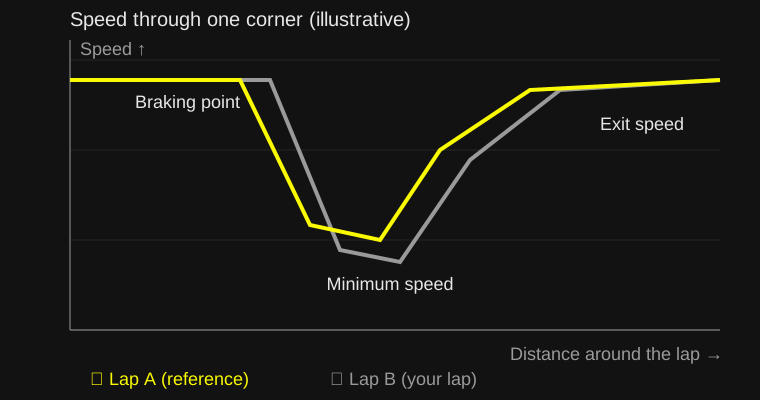
- Pick a corner, usually the one before your longest straight, since exit speed carries down it.
- Find where each lap starts braking. On video, use a fixed marker such as a kerb or a board. On a speed trace, look for where speed starts to fall.
- Compare minimum speed. A lower minimum speed with a later brake is not always a win.
- Compare the exit. Where you reach full throttle, and how fast you are at the end of the corner, matters most when a straight follows.
- Change one thing for the next session, such as a braking marker or the line, and re-check.
Why add GPS and telemetry to video?
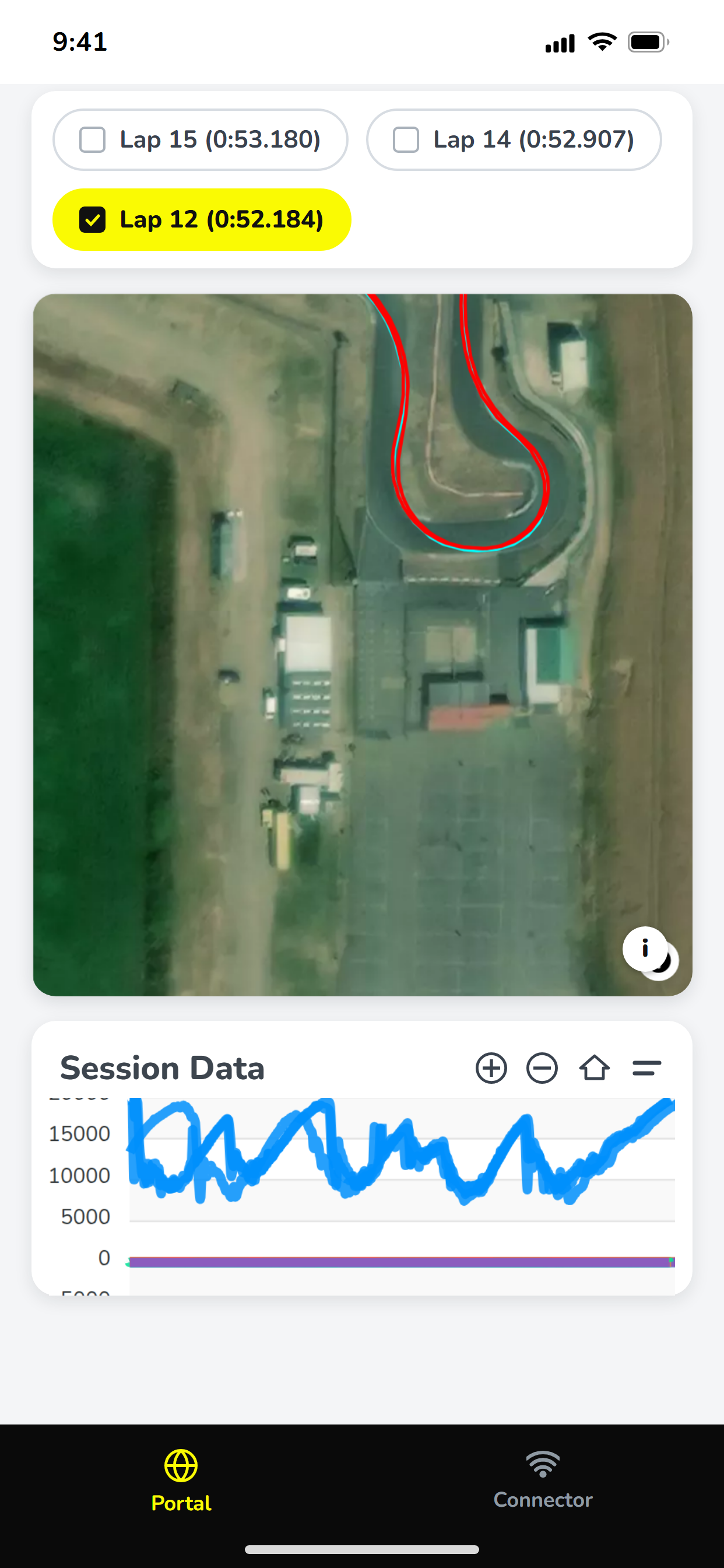
GPS adds the missing speed and position, so you can see which lap was faster at every point rather than guessing. A speed trace synced to the footage lets you pause at the exact moment two laps diverge.
Cameras are one source: common action cameras record GPS, and loggers such as AiM, Alfano and Starlane record it along with RPM and temperatures. The data analysis post covers reading a speed trace in detail, and the kart data post covers what else to record.
How do you connect video to setup changes?
Store the footage, the lap data and the setup against the same session, so a difference in one can be traced to a change in another. This is the step most people skip, and it’s what turns footage into a record you can learn from.
For example, say you drop a tooth on the rear sprocket and the exit of the final corner feels slower on video. With the footage, the speed trace and the sprocket change all attached to one session, you can check it. With the footage on a phone and the setup in a notebook, you’re relying on memory.
KartSetups is built around that idea. Release V3.2 added video analysis: you upload a GoPro or DJI video to a session and it extracts the GPS telemetry, giving a speed-coloured track map synced with the video. Setup, weather and logger files sit in the same session, and Compare Setups highlights what differed between runs. The release notes have the detail, and pricing lists the plans.
What are the common mistakes with kart video?
The common mistakes are watching without a question, comparing laps in different conditions and trusting how a lap feels.
- Comparing a lap in traffic with a clear one. The tow or the blocked corner skews the comparison.
- Ignoring conditions. A faster lap on a warmer, grippier track says little about you or the kart.
- Reviewing whole sessions. Pick three corners and stick to them.
- Not writing down the outcome. Add a line to the session: what you found and what you’ll try next.
Used this way, a camera you already own becomes a useful piece of kit: not for watching highlights, but for answering one specific question per session.